
How to unlock a Windows computer without a password? (Hacking & recovery methods)
Lost or forgotten your Windows password? Can't access your work files or personal memories? Don't panic. There are several proven methods – from simple graphical tools to the "Utilman" hacking technique used by cybersecurity experts. This guide presents the most effective solutions to unlock a computer password, whether you're on Windows 10, 11 or older versions.
1. Pass Revelator Windows: the no‑tech‑skill solution (recommended)
Pass Revelator Windows is specialized software for Windows password recovery. Unlike manual hacking methods, this tool offers a simple interface and requires no command lines. It works by analyzing Windows configuration files and the registry to extract or reset local account credentials.
Step‑by‑step procedure with Pass Revelator Windows:
- Download the tool from the official website: Pass Revelator
- Put the file onto a USB drive.
- Boot the locked computer from this USB drive.
- Pass Revelator Windows loads automatically and removes the computer's password automatically.
- Restart the computer, the password will be removed.
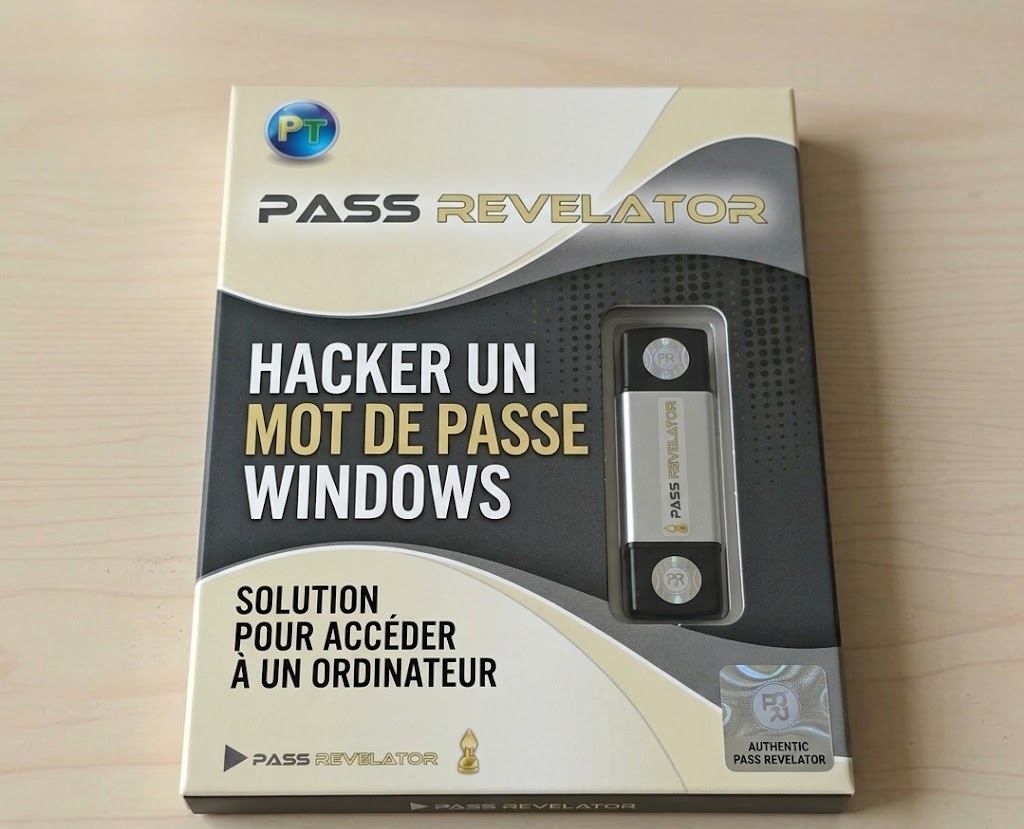
Pass Revelator Windows USB key.
Advantages: no hacking knowledge required, compatible with all Windows (7 to 11), supports Microsoft accounts.
2. Utilman method: the famous hacking technique
Utilman.exe (Utility Manager) is a Windows component that launches when you press Win+U at the login screen. By replacing this file with cmd.exe (command prompt) via a recovery disk, you get SYSTEM access with highest privileges, allowing you to reset any password. This technique is widely used by technicians and ethical hackers.
Prerequisites:
- A Windows installation disk (DVD or USB) or a recovery drive.
- Access to BIOS/UEFI to boot from external media.
Detailed steps:
- Boot from the installation media: Insert the Windows USB/DVD, restart and press the boot key (F12, Esc, F2 depending on your PC). Select the media.
- On the installation screen, press Shift+F10 to open a command prompt.
- Identify the system drive letter: type
diskpartthenlist volume. Locate the "C:" volume (often 100-200 GB). Note its letter (sometimes D: or E: in the WinPE environment). Typeexit. - Assume the system drive is D: – execute:
move D:\Windows\System32\utilman.exe D:\Windows\System32\utilman.old
copy D:\Windows\System32\cmd.exe D:\Windows\System32\utilman.exe
- Restart the computer normally (remove the media).
- At the login screen, click the accessibility icon (or press Win+U). A command prompt opens with SYSTEM privileges.
- To reset the password:
net user Username NewPassword
(ReplaceUsernamewith the locked account name. If unknown, typenet userto list accounts.) - Close the window and log in with the new password.
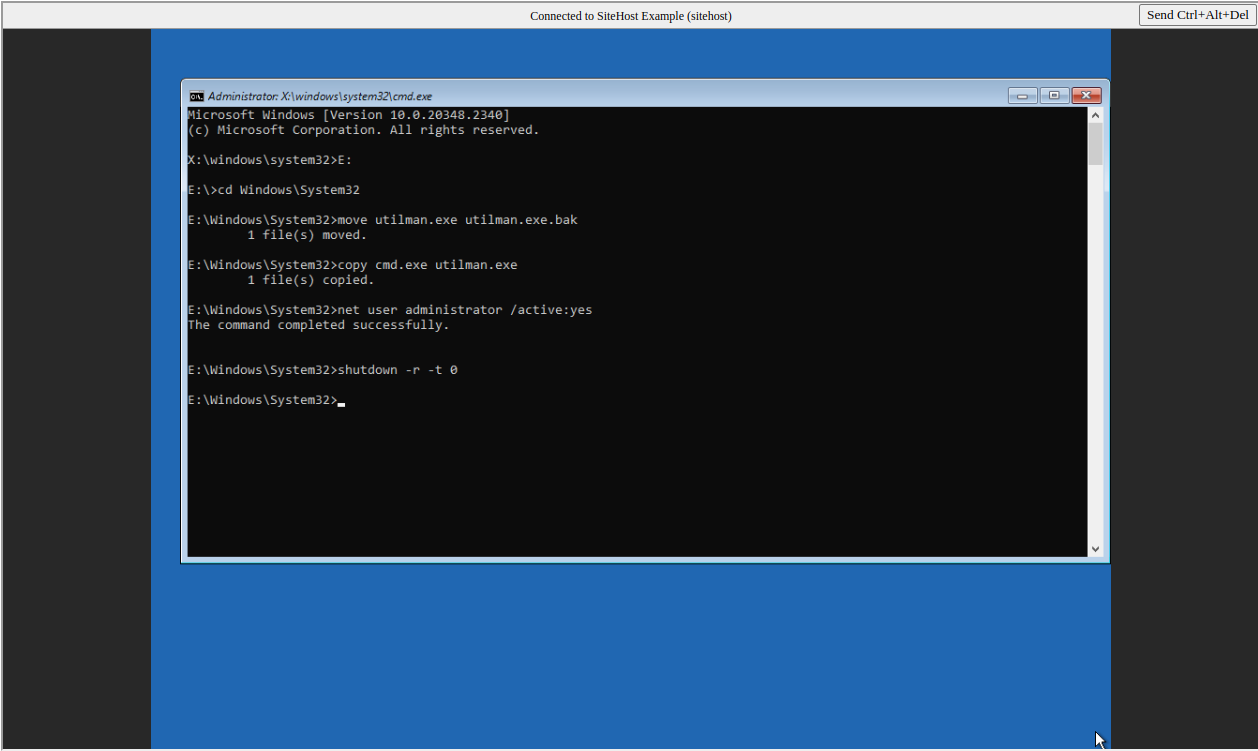
IMAGE2: Replacing utilman.exe with cmd.exe via installation DVD command prompt.
sethc.exe (Sticky Keys) the same way. In that case, after reboot, press Shift five times to trigger the command prompt.
3. Sticky Keys method – simple variant
The principle is identical to Utilman but targets sethc.exe. Ideal if the accessibility icon is disabled or if you are comfortable with keyboard shortcuts.
- Follow steps 1 to 4 of the Utilman method, but replace the commands with:
move D:\Windows\System32\sethc.exe D:\Windows\System32\sethc.old
copy D:\Windows\System32\cmd.exe D:\Windows\System32\sethc.exe
- Reboot, and at the login screen, press the Shift key five times.
- A command prompt opens. Use the
net usercommand as above.
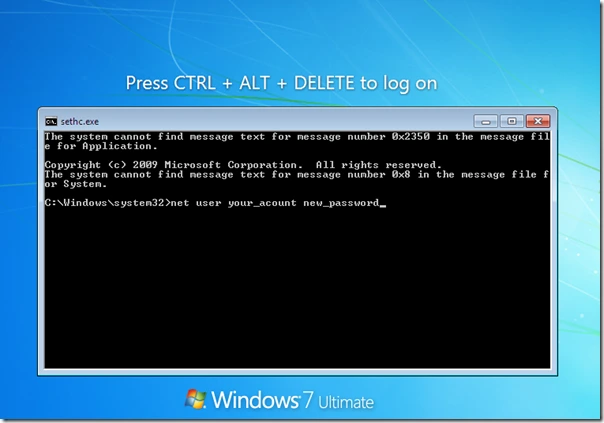
Trigger command prompt via 5× Shift after replacing sethc.exe.
4. Use a password reset disk (foresighted)
If you had the foresight to create a "password reset disk" before being locked out, this method is the simplest and official. Unfortunately, most users don't do it.
- Insert the USB drive or floppy disk (on old systems) containing the
userkey.pswfile. - At the login screen, after a wrong password, click "Reset password".
- Follow the wizard – you can set a new password immediately.
To create this disk in advance (on a PC you have access to): Control Panel → User Accounts → Create a password reset disk.
How to protect yourself against these hacking techniques?
While these methods can save you, they can also be used by malicious people with physical access to your machine. Here is how to strengthen your computer's security:
🔒 BitLocker encryption
Enable BitLocker (Windows Pro/Enterprise) with a TPM. Even if a hacker replaces utilman, they cannot read your data without the recovery key.
🔐 BIOS/UEFI password
Set an administrator password in the BIOS. This prevents booting from an external USB or DVD.
🛡️ Microsoft account with 2FA
Use a Microsoft account coupled with two‑factor authentication. Resetting then requires your phone.
📁 Disable guest and limit local accounts
Remove unused local accounts. An attacker cannot exploit them.
🧹 Verify system file integrity
Use sfc /scannow and DISM periodically to detect any suspicious modifications (like utilman replacement).
📎 Physical locking
In a professional environment, use a Kensington cable or store the computer in a safe.
FAQ: Frequently asked questions about unlocking a computer password
Do these methods work on Windows 11 with a Microsoft account?
Yes, Utilman and Sticky Keys techniques also work on Windows 11 for local accounts. For a Microsoft account, you can reset the password via command prompt (net user command) but this will disconnect the Microsoft account – you will lose some sync. Pass Revelator partially handles Microsoft accounts.
Can I use these techniques on a work computer?
No, unless you are the system administrator with authorization. Any unauthorized attempt is illegal.
What if I don't have a Windows installation media?
You can create a bootable USB drive with Microsoft's Media Creation Tool (on another PC). Alternatively, use Linux Live CDs (Ubuntu) to access files and replace utilman manually.
Is the Pass Revelator Windows method free?
Pass Revelator Windows offers a limited free trial. For full use, a license is required.
How do I recover my files if I cannot unlock the password?
Boot from a Linux USB drive, mount the Windows disk and copy your data to an external drive. Then you can reinstall Windows. This is a last resort solution.
Successful login after password reset.